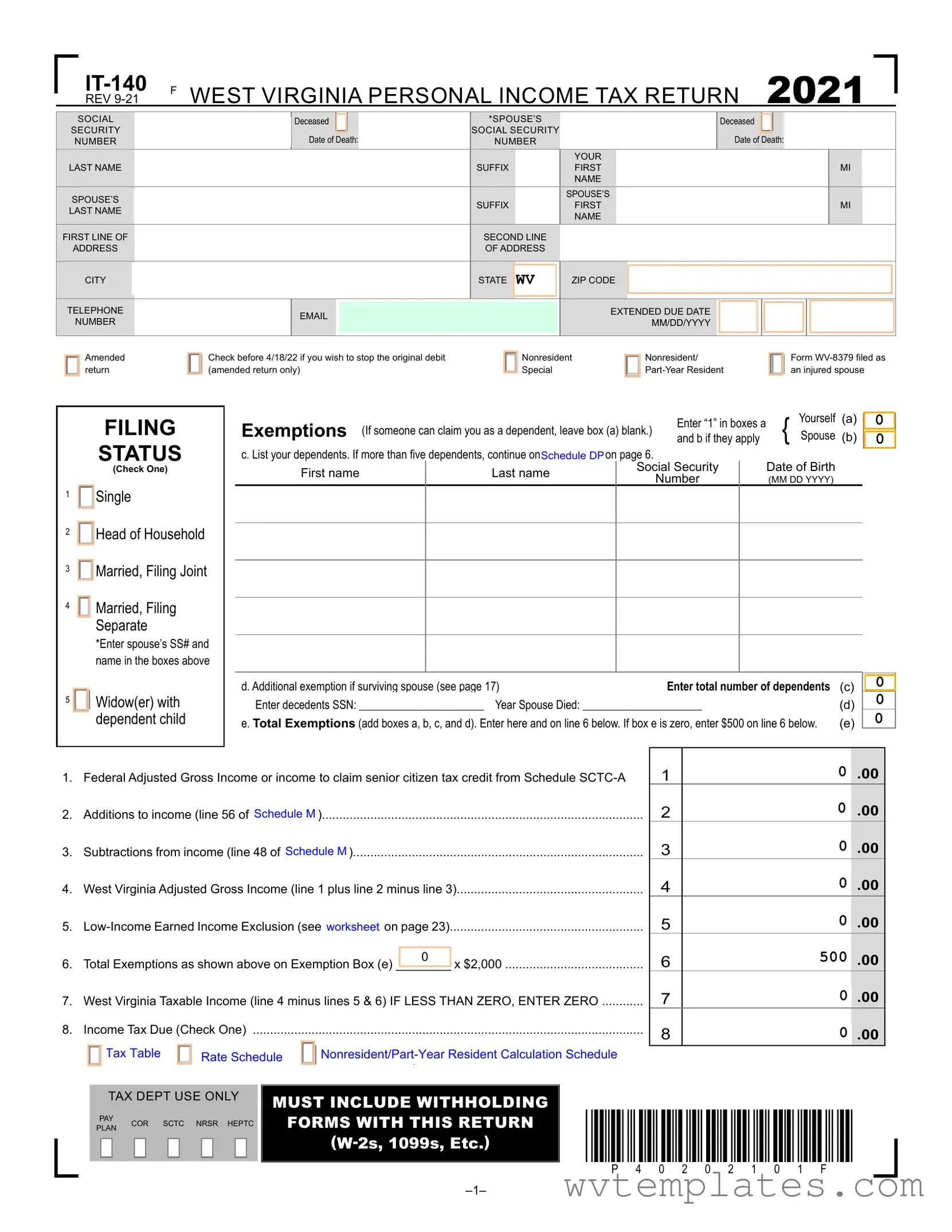
Free Wv It 140 Form
The WV IT-140 form, a cornerstone document for residents of West Virginia, plays a pivotal role in the annual ritual of personal income tax filing. Designed to encapsulate an individual’s financial circumstances over the tax year 2020, it demands meticulous input of information ranging from basic identification details such as social security numbers and addresses to more nuanced financial data that influence tax computations. This form allows taxpayers to declare their filing status, exemptions, income, and potential deductions or credits which altogether determine the final tax liability or refund due. Additionally, it includes provisions for special situations like the death of a spouse, amendments to prior filings, and options for nonresidents or part-year residents. The form also extends to detail the specifics of various income modifications, tax deductions for senior citizens, and credits for military service, education savings, and more. With spaces dedicated to estimated payments, withholding details, use tax obligations, and the option for direct deposit of refunds, the IT-140 form integrates the essential elements required for comprehensive tax reporting and underscores its significance in ensuring a fair and accurate financial account with the state.
Wv It 140 Example
|
|
F |
WEST VIRGINIA PERSONAL INCOME TAX RETURN |
2021 |
|
|
|
|
REV |
|
|
SOCIAL
SECURITY
NUMBER
LAST NAME
SPOUSE’S
LAST NAME
FIRST LINE OF
ADDRESS
CITY
TELEPHONE
NUMBER
|
|
|
|
|
Deceased |
|
|
|
*SPOUSE’S |
|
|
|
|
|
|
Deceased |
|
|
|
|
|
|
|
|
|
|||||
|
|
|
|
|
|
|
|
|
|
|
|
|
|
|
|
|
|
|
|
|
|
|
||||||||
|
|
|
|
|
|
|
|
|
SOCIAL SECURITY |
|
|
|
|
|
|
|
|
|
|
|
|
|
|
|
|
|
||||
|
|
|
|
|
Date of Death: |
|
|
|
|
|
|
Date of Death: |
|
|||||||||||||||||
|
|
|
|
|
NUMBER |
|
|
|
|
|
|
|
||||||||||||||||||
|
|
|
|
|
|
|
|
|
|
|
|
|
|
|
YOUR |
|
|
|
|
|
|
|
|
|
|
|
|
|
|
|
|
|
|
|
|
|
|
|
|
|
|
|
|
|
|
|
|
|
|
|
|
|
|
|
|
|
|
|
|
||
|
|
|
|
|
|
|
|
|
SUFFIX |
|
|
|
FIRST |
|
|
|
|
|
|
|
|
|
|
|
MI |
|
|
|||
|
|
|
|
|
|
|
|
|
|
|
|
|
|
|
NAME |
|
|
|
|
|
|
|
|
|
|
|
|
|
|
|
|
|
|
|
|
|
|
|
|
|
|
|
|
|
|
|
|
|
|
|
|
|
|
|
|
|
|
|
|
||
|
|
|
|
|
|
|
|
|
|
|
|
|
|
|
SPOUSE’S |
|
|
|
|
|
|
|
|
|
|
|
|
|
||
|
|
|
|
|
|
|
|
|
SUFFIX |
|
|
|
FIRST |
|
|
|
|
|
|
|
|
|
|
MI |
|
|||||
|
|
|
|
|
|
|
|
|
|
|
|
|
|
|
NAME |
|
|
|
|
|
|
|
|
|
|
|
|
|
||
|
|
|
|
|
|
|
|
|
|
|
|
|
|
|
|
|
|
|
|
|
|
|
|
|
|
|
|
|
|
|
|
|
|
|
|
|
|
|
|
|
|
|
|
|
|
|
|
|
|
|
|
|
|
|
|
|
|
|
|
|
|
|
|
|
|
|
|
|
|
|
SECOND LINE |
|
|
|
|
|
|
|
|
|
|
|
|
|
|
|
|
|
||||
|
|
|
|
|
|
|
|
|
|
|
|
|
|
|
|
|
|
|
|
|
|
|
|
|
|
|||||
|
|
|
|
|
|
|
|
|
OF ADDRESS |
|
|
|
|
|
|
|
|
|
|
|
|
|
|
|
|
|
||||
|
|
|
|
|
|
|
|
|
|
|
|
|
|
|
|
|
|
|
|
|
|
|
|
|
|
|
|
|
|
|
|
|
|
|
|
|
|
|
|
|
|
|
|
|
|
|
|
|
|
|
|
|
|
|
|
|
|
|
|
|
|
|
|
|
|
|
|
|
|
|
STATE |
WV |
|
|
ZIP CODE |
|
|
|
|
|
|
|
|
|
|
|
|
|||||
|
|
|
|
|
|
|
|
|
|
|
|
|
|
|
|
|
|
|
|
|
|
|
|
|
|
|
|
|
|
|
|
|
|
|
|
|
|
|
|
|
|
|
|
|
|
EXTENDED DUE DATE |
|
|
|
|
|
|
|
|
|
|
|
||||
|
|
|
|
|
|
|
|
|
|
|
|
|
|
|
|
|
|
|
|
|
|
|
|
|
||||||
|
|
|
|
|
|
|
|
|
|
|
|
|
|
|
|
|
|
|
|
|
|
|
|
|
||||||
|
|
|
|
|
|
|
|
|
|
|
|
|
|
|
MM/DD/YYYY |
|
|
|
|
|
|
|
|
|
|
|
||||
|
|
|
|
|
|
|
|
|
|
|
|
|
|
|
|
|
|
|
|
|
|
|
|
|
|
|
|
|
||
|
|
|
|
|
|
|
|
|
|
|
|
|
|
|
|
|
|
|
|
|
|
|
|
|
|
|
|
|
|
|
|
|
|
|
|
|
|
|
|
|
|
|
|
|
|
|
|
|
|
|
|
|
|
|
|
|
|
|
|
|
|
Amended |
return |
Check before 4/18/22 if you wish to stop the original debit (amended return only)
Nonresident Special
Nonresident/
Form
1
2
3
4
5
FILING
STATUS
(Check One)

 Single

 Head of Household

 Married, Filing Joint
Married, Filing
Separate
*Enter spouse’s SS# and name in the boxes above
Widow(er) with dependent child
|
|
|
|
|
Enter “1” in boxes a |
Yourself |
(a) |
0 |
|
Exemptions |
(If someone can claim you as a dependent, leave box (a) blank.) |
{ Spouse |
|
|
|||||
and b if they apply |
(b) |
|
|||||||
0 |
|||||||||
c. List your dependents. If more than five dependents, continue on ScheduleSche |
DPP on page 6. |
|
|
|
|
|
|||
First name |
|
Last name |
|
Social Security |
|
Date of Birth |
|
|
|
|
|
|
Number |
|
(MM DD YYYY) |
|
|
||
|
|
|
|
|
|
|
|
||
|
|
|
|
|
|
|
|
|
|
|
|
|
|
|
|
|
|
|
|
|
|
|
|
|
|
|
|
|
|
|
|
|
|
|
|
|
|
|
|
|
|
|
|
|
|
|
|
|
|
d. Additional exemption if surviving spouse (see page 17) |
Enter total number of dependents |
(c) |
|
0 |
Enter decedents SSN: ______________________ Year Spouse Died: _____________________ |
(d) |
0 |
||
|
|
|||
e. Total Exemptions (add boxes a, b, c, and d). Enter here and on line 6 below. If box e is zero, enter $500 on line 6 below. |
(e) |
0 |
||
|
|
|||
1.Federal Adjusted Gross Income or income to claim senior citizen tax credit from Schedule
2.Additions to income (line 56 of Schedulele M).............................................................................................
3.Subtractions from income (line 48 of Schedulele M)....................................................................................
4.West Virginia Adjusted Gross Income (line 1 plus line 2 minus line 3)......................................................
5.
0
6. Total Exemptions as shown above on Exemption Box (e) ________ x $2,000 ........................................
7. West Virginia Taxable Income (line 4 minus lines 5 & 6) IF LESS THAN ZERO, ENTER ZERO ............
8. |
Income Tax Due (Check One) |
||
|
Tax Table |
RateRateScheduleSchedule |
|
|
Tax Table |
Nonresident/PartN |
|
1
2
3
4
5
6
7
8
0.00
0.00
0.00
0.00
0.00
500.00
0.00
0.00
TAX DEPT USE ONLY
PAY COR SCTC NRSR HEPTC PLAN
MUST INCLUDE WITHHOLDING
FORMS WITH THIS RETURN
*P40202101F*
P |
4 |
0 |
2 |
0 |
2 |
1 |
0 |
1 |
F |
|
|
|
PRIMARY LAST NAME |
|
|
|
|
|
SOCIAL SECURITY |
|
|
|
|
|
|
|
8.Total Taxes Due |
|
|||
|
|
|
|
|
|
|
|
|
|
|
|
|
|
|
|
||||||
|
|
|
SHOWN ON FORM |
|
|
|
|
|
|
|
|
|
|
|
|
|
|||||
|
|
|
|
|
|
|
|
NUMBER |
|
|
|
|
|
|
|
|
(line 8 from previous page) |
8 |
|||
|
|
|
|
|
|
|
|
|
|
|
|
|
|
|
|
||||||
|
|
|
|
|
|
|
|
|
|
|
|
|
|
|
|
|
|
|
|
||
|
|
|
|
|
|
|
|
|
|
|
|
|
|
|
|
|
|
|
|
|
|
|
|
|
|
|
|
|
|
|
|
|
|
|
|
|
|
|
|
|
|
|
|
9. |
|
Credits from Tax Credit Recap Schedule (see schedule on page 5 ) (now includes the Family Tax Credit) |
9 |
||||||||||||||||||
10. |
Line 8 minus 9. If line 9 is greater than line 8, enter 0 |
|
|
|
|
|
|
|
|
|
|
10 |
|||||||||
11. |
Overpayment previously refunded or credited (amended return only) |
|
|
|
|
|
|
|
|
|
11 |
||||||||||
12. |
Penalty Due from Form |
|
CHECK IF REQUESTING WAIVER/ANNUALIZED |
12 |
|||||||||||||||||
|
|||||||||||||||||||||
|
WORKSHEET ATTACHED |
|
|
|
|
If you owe penalty, enter here |
|||||||||||||||
13. |
West Virginia Use Tax Due on |
|
|
|
|
|
|
|
|
|
|
|
|||||||||
|
|
(See ScScheduleuleUTUT on page 9). |
|
|
|
|
|
|
|
|
CHECK IF NO USE TAX DUE |
13 |
|||||||||
14. |
..................................................................................Add lines 10 through 13. This is your total amount due |
|
|
|
|
|
|
|
|
|
14 |
||||||||||
15. |
West Virginia Income Tax Withheld (See instructions) |
|
|
Check if withholding from NRSR |
15 |
||||||||||||||||
|
|
||||||||||||||||||||
|
|
(Nonresident Sale of Real Estate) |
|||||||||||||||||||
16. |
.......................................................................Estimated Tax Payments and Payments with Schedule 4868 |
|
|
|
|
|
|
|
|
|
16 |
||||||||||
17. |
17 |
||||||||||||||||||||
18. |
Senior Citizen Tax Credit for property tax paid (include Schedule |
.................................................. |
|
|
|
|
|
18 |
|||||||||||||
19. |
.......................Homestead Excess Property Tax Credit for property tax paid (include Schedule |
19 |
|||||||||||||||||||
20. |
Amount paid with original return (amended return only) |
|
|
|
|
|
|
|
|
|
20 |
||||||||||
21. |
Payments and Refundable Credits (add lines 15 through 20) |
|
|
|
|
|
|
|
|
|
21 |
||||||||||
|
|
|
|
|
|
|
|
|
|
|
|
|
|
||||||||
22. |
Balance Due (line 14 minus line 21). If Line 21 is greater than line 14, complete line 23 |
..... |
PAY THIS AMOUNT |
|
22 |
||||||||||||||||
|
|
|
|
||||||||||||||||||
23. |
Line 21 minus line 14. This is your overpayment |
|
|
|
|
|
|
|
|
|
23 |
||||||||||
24. |
Donations of part or all of line 23. Indicate below and enter the sum of columns 24A, 24B, and 24C on Line 24 |
||||||||||||||||||||
|
|
|
24A. WEST VIRGINIA |
|
|
24B. WEST VIRGINIA DEPARTMENT |
|
|
|
24C. DONEL C. KINNARD MEMORIAL |
|
||||||||||
|
|
|
CHILDREN’S TRUST FUND |
|
|
OF VETERANS ASSISTANCE |
|
|
|
STATE VETERANS CEMETERY |
|
||||||||||
|
|
|
|
|
0 |
|
|
|
|
0 |
|
|
0 |
|
|
24 |
|||||
|
|
|
|
|
|
|
|
|
|
|
|
|
|
|
|
|
|
|
|
|
|
25. |
Amount of Overpayment to be credited to your 2022 estimated tax |
............................................................... |
|
|
|
|
|
|
|
|
|
25 |
|||||||||
|
|
|
|
|
|
|
|
|
|
|
|
|
|
|
|
||||||
26. |
Refund due to you (line 23 minus line 24 and line 25) |
|
|
|
|
|
|
REFUND |
|
26 |
|||||||||||
|
|
|
|
|
|
|
|
|
|
|
|
|
|
|
|
|
|
|
|
|
|
0.00
0.00
0.00
0.00
0.00
0.00
0.00
0.00
0.00
0.00
0.00
0.00
0.00
0.00
0.00
0.00
0.00
0.00
0.00
Direct Deposit |
|
|
|
|
|
of Refund |
CHECKING |
SAVINGS |
|
|
|
|
|
|
ROUTING NUMBER |
|
ACCOUNT NUMBER |
PLEASE REVIEW YOUR ACCOUNT INFORMATION FOR ACCURACY. INCORRECT ACCOUNT INFORMATION MAY RESULT IN A $15.00 RETURNED PAYMENT CHARGE.
I authorize the State Tax Department to discuss my return with my preparer 
 YES
YES
NO
Under penalty of perjury, I declare that I have examined this return, accompanying schedules, and statements, and to the best of my knowledge and belief, it is true, correct and complete.
Your Signature |
|
|
Date |
Spouse’s Signature |
Date |
Telephone Number |
||||
|
|
Preparer: Check |
|
|
|
|
|
|
|
|
|
|
HERE if client is |
|
|
|
|
|
|
|
|
|
|
requesting that form |
|
|
|
|
|
|
|
|
|
|
NOT be |
|
|
|
|
|
|
|
|
|
Preparer’s EIN |
Signature of preparer other than above |
Date |
Telephone Number |
||||||
|
|
|
|
|
||||||
|
|
|
|
|
|
|
|
|
|
|
Preparer’s Printed Name |
|
|
Preparer’s Firm |
|
|
|||||
|
|
|
FOR REFUND, MAIL TO THIS ADDRESS: |
|
FOR BALANCE DUE, MAIL TO THIS ADDRESS: |
|
|
|||
|
|
|
WV STATE TAX DEPARTMENT |
|
|
WV STATE TAX DEPARTMENT |
|
|
||
|
|
|
|
P.O. BOX 1071 |
|
|
P.O. BOX 3694 |
|
|
|
|
|
|
CHARLESTON, WV |
|
|
CHARLESTON, WV |
|
|
||
Payment Options: Returns filed with a balance of tax due may pay through any of the following methods:
•Check or Money Order payable to the WV State Tax Department - Enclose check or money order with your return.
•Electronic Payment - May be made by visiting mytaxes.wvtax.gov and clicking on “Pay Personal Income Tax”.
•Credit Card Payment – May be made by visiting the Treasurer’s website at: epay.wvsto.com/tax
*P40202102F*
P |
4 |
0 |
2 |
0 |
2 |
1 |
0 |
2 |
F |

Schedule
Form
M F MODIFICATIONS TO ADJUSTED GROSS INCOME 2021
|
Modifications Decreasing Federal Adjusted Gross Income |
|
|
|
|
|
|
Column A (You) |
|
|
|
|
Column B (Spouse) |
||||||||||||||||||||||||||||||
|
27. |
Interest or dividends received on United States or West Virginia obligations, or |
|
|
|
|
|
|
|
|
|
|
|
|
|
|
|
|
|
|
|
||||||||||||||||||||||
|
|
|
|
|
|
|
|
|
|
|
|
|
|
|
|
|
|
|
|
||||||||||||||||||||||||
|
|
|
|
|
|
|
|
|
|
|
|
|
|
|
|
|
|
|
|
||||||||||||||||||||||||
|
|
|
allowance for government obligation income, included in federal adjusted gross income |
27 |
|
|
0 |
|
|
|
.00 |
|
0 |
|
|
|
.00 |
||||||||||||||||||||||||||
|
|
|
but exempt from state tax |
|
|
|
|
|
|
|
|
|
|
|
|
|
|
|
|
|
|
|
|
|
|
||||||||||||||||||
|
|
|
|
|
|
|
|
|
|
|
|
|
|
|
|
|
|
|
|
|
|
|
|
|
|
|
|
|
|
|
|
|
|
||||||||||
|
28. |
Total amount of any benefit (including survivorship annuities) received from certain |
28 |
|
|
|
|
|
|
|
|
|
|
|
|
|
|
|
|
|
|
||||||||||||||||||||||
|
|
|
|
|
|
|
|
|
|
|
|
|
|
|
|
|
|
|
|||||||||||||||||||||||||
|
|
|
federal retirement systems by retired federal law enforcement officers |
|
|
0 |
|
|
|
.00 |
|
|
0 |
|
|
.00 |
|||||||||||||||||||||||||||
|
29. |
Total amount of any benefit (including survivorship annuities) received from WV state |
29 |
|
|
|
|
|
|
|
|
|
|
|
|
|
|
|
|
|
|
||||||||||||||||||||||
|
|
|
|
|
|
|
|
|
|
|
|
|
|
|
|
|
|
|
|||||||||||||||||||||||||
|
|
|
or local police, deputy sheriffs’ or firemen’s retirement system, Excluding PERS |
0 |
|
|
|
.00 |
0 |
|
|
|
.00 |
||||||||||||||||||||||||||||||
|
|
|
page 22 |
|
|
|
|
|
|
|
|
|
|
|
|
|
|
|
|
|
|
|
|
|
|
|
|
|
|
|
|
|
|
|
|
|
|
|
|
|
|
|
|
|
|
|
|
|
|
|
|
|
|
|
|
|
|
|
|
|
|
|
|
|
|
|
|
|
|
|
|
|
|
|
|
|
|
|
|
|
|
|
|
|
|
||
|
30. |
Military Retirement Modification |
|
|
|
|
|
|
|
|
|
|
|
|
|
|
|
|
|
|
|
|
|
|
|
|
|
|
|
|
|||||||||||||
|
|
|
|
|
|
|
|
|
|
|
|
30 |
|
|
0 |
|
.00 |
|
|
|
0 |
|
|
|
.00 |
||||||||||||||||||
|
|
|
|
|
|
|
|
|
|
|
|
|
|
|
|
|
|
|
|
|
|
|
|
|
|
|
|
|
|
|
|
|
|
|
|
|
|
|
|
|
|
|
|
|
|
|
|
|
|
|
|
|
|
|
|
|
|
|
|
|
|
|
|
|
|
|
|
|
|
|
|
|
|
|
|
|
|
|
|
|
|
|
|
|
|
|
|
|
31. |
Other Retirement Modification |
|
|
|
Column A (You) |
|
|
|
Column B (Spouse) |
|
|
|
|
|
|
|
|
|
|
|
|
|
|
|
|
|
|
|
||||||||||||||
|
(a) West Virginia Teachers’ and |
|
|
|
|
0 |
|
|
|
|
|
|
|
|
|
|
|
|
|
|
|
|
|
|
|
|
|
|
|
|
|
|
|
||||||||||
|
|
|
|
|
|
|
0 |
|
|
|
|
|
|
|
|
|
|
|
|
|
|
|
|
|
|
|
|
|
|||||||||||||||
|
|
|
Public Employees’ Retirement |
|
|
|
|
.00 |
|
.00 |
|
|
|
|
Add lines 31 (a) and (b). If that sum is greater than $2000, enter $2000 |
||||||||||||||||||||||||||||
|
(b)Federal Retirement Systems |
|
|
|
|
|
|
|
|
|
|
|
|
|
|
|
|
|
|
|
|
|
|
|
|
|
|
|
|
|
|
|
|
||||||||||
|
|
|
|
|
|
|
|
|
|
|
|
|
|
|
|
|
|
|
0 |
|
|
|
|
|
|
|
|
|
|
|
|
|
|||||||||||
|
|
|
|
|
|
|
|
|
|
|
|
|
|
|
|
|
|
|
|
|
|
|
0 |
|
|
|
|
|
|||||||||||||||
|
|
|
|
|
|
|
|
|
|
|
|
|
|
|
|
|
|
|
|
|
|
|
|
|
|
|
|
||||||||||||||||
|
|
|
(Title 4 USC §111) |
|
|
|
|
|
|
|
|
|
0 |
|
.00 |
|
|
0 |
|
.00 |
31 |
|
|
|
|
|
|
|
.00 |
|
|
|
.00 |
||||||||||
|
32. |
Social Security Benefits |
|
|
|
|
|
|
|
|
|
|
|
|
|
|
|
|
|
|
|
|
|
|
|
|
|
|
|
||||||||||||||
|
|
|
|
|
|
|
|
|
|
|
|
|
|
|
|
|
|
|
|
|
|
|
|
|
|
|
|
|
|
|
|
|
|
||||||||||
|
|
|
|
|
|
0 |
|
.00 |
0 |
|
.00 |
|
|
|
|
|
|
|
|
|
|
|
|
|
|
|
|
|
|
|
|||||||||||||
|
(a) TOTAL Social Security Benefits. |
|
|
|
|
|
|
|
|
|
You cannot claim this modification if your Federal AGI exceeds |
||||||||||||||||||||||||||||||||
|
(b) Benefits exempt for Federal tax |
|
|
|
|
|
|
|
|
|
|
|
|
|
|
|
|
$ 50,000 for SINGLE or MARRIED SEPARATE filers |
|||||||||||||||||||||||||
|
|
|
|
|
|
|
|
|
|
|
|
|
|
||||||||||||||||||||||||||||||
|
|
|
|
|
|
|
|
|
|
|
|
|
|
|
|
|
$100,000 for MARRIED JOINT filers |
|
|
||||||||||||||||||||||||
|
|
|
|
|
|
|
|
|
|
|
|
|
|
|
|
|
|
||||||||||||||||||||||||||
|
|
|
purposes |
|
|
|
|
|
|
|
|
|
|
|
0 |
|
.00 |
|
|
0 |
|
.00 |
|
|
|
|
Multiply 32 (c) by 0.65 |
|
|
|
|
|
|
|
|
|
|
||||||
|
(c) Benefits taxable for Federal tax |
|
|
|
|
|
|
|
|
|
|
|
|
|
|
|
|
|
|
|
|
|
|
|
|
|
|
|
|
|
|
|
|||||||||||
|
|
|
|
|
|
|
|
|
|
|
|
|
|
|
|
|
|
|
|
|
|
|
|
|
|
|
|
|
|
|
|
||||||||||||
|
|
|
|
0 |
|
|
|
|
|
|
|
|
|
|
|
|
|
|
|
|
|
|
|
|
|
|
|
|
|
|
|
||||||||||||
|
|
|
|
|
|
|
|
|
|
|
|
|
|
|
|
|
|
|
|
|
|
|
|
0 |
|
|
|
|
|||||||||||||||
|
|
|
|
|
|
|
|
|
|
|
|
|
|
|
0 |
|
|
|
|
|
|
|
|
|
|
||||||||||||||||||
|
|
|
|
|
|
|
|
|
|
|
|
|
|
|
|
|
|
|
|
|
|
|
|
|
|||||||||||||||||||
|
|
|
purposes (line a minus line b) |
|
|
|
|
|
.00 |
0 |
|
.00 |
32 |
|
|
|
|
|
.00 |
|
|
|
|
.00 |
|||||||||||||||||||
|
|
|
|
|
|
|
|
|
|
|
|
|
|
|
|
|
|
|
|
|
|
|
|
|
|
|
|
|
|
|
|
|
|
|
|
|
|
|
|
|
|
|
|
|
|
|
|
|
|
|
|
|
|
|
|
|
|
|
|
|
|
|
|
|
|
|
|
|
|
|
|
|
|
|
|
|
|
|
|
|
|
|
|
|
|
|
|
|
|
|
|
|
|
|
|
|
|
|
|
|
|
|
|
|
|
|
|
|
|
|
|
|
|
|
|
|
|
|
|||||||||||||
|
|
|
|
|
|
|
|
|
|
|
|
|
|
|
|
|
|
|
|
|
|
|
|
|
33 |
|
|
|
|
|
|
|
|
.00 |
|
0 |
|
|
|
.00 |
|||
|
33. |
Certain assets held by subchapter S Corporation bank |
.................................................. |
|
|
|
|
|
|
|
|
|
0 |
|
|
|
|
|
|
|
|||||||||||||||||||||||
|
|
|
|
|
|
|
|
|
|
|
|
|
|
|
|
|
|
|
|
|
|
|
|||||||||||||||||||||
|
34. |
Active Duty Military pay for personnel with West Virginia Domicile |
|
|
|
|
|
|
|
|
|
|
|
|
|
|
|
|
|
|
|
|
|||||||||||||||||||||
|
|
34 |
|
|
|
0 |
|
|
|
.00 |
|
|
|
0 |
|
|
|
.00 |
|||||||||||||||||||||||||
|
|
|
(See instructions on page 22) |
........................................................................................ |
|
|
|
|
|
|
|
|
|
|
|
|
|
|
|
|
|
|
|
|
|
|
|
||||||||||||||||
|
|
|
|
|
|
|
|
|
|
|
|
|
|
|
|
|
|
|
|
|
|
|
|
|
|
|
|
|
|
|
|||||||||||||
|
|
|
|
|
|
|
|
|
|
|
|
|
|
|
|
|
|
|
|
|
|
|
|
|
|
|
|
|
|
|
|
|
|
||||||||||
|
35. |
Active Military Separation (see instructions on page 22) |
|
|
|
|
|
|
|
|
|
|
|
|
|
|
|
|
|
|
|
|
|
|
|
|
|
||||||||||||||||
|
|
|
|
|
|
|
35 |
|
|
|
0 |
|
|
|
.00 |
|
|
|
0 |
|
|
|
.00 |
||||||||||||||||||||
|
|
|
Must enclose military orders and discharge papers |
|
|
|
|
|
|
|
|
|
|
|
|
|
|
|
|
|
|||||||||||||||||||||||
|
|
|
|
|
|
|
|
|
|
|
|
|
|
|
|
|
|
|
|
|
|
|
|
||||||||||||||||||||
|
|
|
|
|
|
|
|
|
|
|
|
|
|
|
|
|
|
|
|
|
|
|
|
|
|
|
|
|
|
|
|
|
|
|
|
|
|
|
|
|
|
|
|
|
|
|
|
|
|
|
|
|
|
|
|
|
|
|
|
|
|
|
|
|
|
|
|
|
|
|
|
|
|
|
|||||||||||||
|
36. |
Refunds of state and local income taxes received and reported as income to the IRS ... |
36 |
|
0 |
|
|
|
.00 |
0 |
|
|
|
.00 |
|||||||||||||||||||||||||||||
|
|
|
|
|
|
|
|
|
|
|
|
|
|
|
|
||||||||||||||||||||||||||||
|
|
|
|
|
|
|
|
|
|
|
|
|
|
|
|
||||||||||||||||||||||||||||
|
|
|
|
|
|
|
|
|
|
|
|
|
|
37 |
|
|
|
|
|
|
|
|
|
|
|
|
|
|
|
|
|||||||||||||
|
37. |
Contributions to the West Virginia Prepaid Tuition/Savings Plan Trust Funds |
|
|
|
0 |
|
|
|
.00 |
|
0 |
|
|
|
.00 |
|||||||||||||||||||||||||||
|
|
|
|
|
|
|
|
|
|
|
|
|
|
|
|
|
|
|
|
|
|
|
|
|
|
|
|
|
|
|
|
|
|
|
|
|
|
|
|
|
|
|
|
|
|
|
|
|
|
|
|
|
|
|
|
|
|
|
|
|
|
|
|
|
|
|
|
|
38 |
|
|
|
|
|
|
|
|
.00 |
|
|
|
|
|
|
.00 |
||
|
38. |
Railroad Retirement Board Income received |
|
|
|
|
|
|
|
|
|
|
|
0 |
|
|
|
|
|
0 |
|
|
|||||||||||||||||||||
|
.................................................................. |
|
|
|
|
|
|
|
|
|
|
|
|
|
|
|
|
|
|
|
|
|
|
||||||||||||||||||||
|
|
|
|
|
|
|
|
|
|
|
|
|
|
|
|
|
|
|
|
|
|
|
|
|
|
|
|
|
|
|
|
|
|
||||||||||
|
39. |
|
|
|
|
|
|
|
|
|
|
|
|
39 |
|
|
0 |
|
|
|
.00 |
|
0 |
|
|
.00 |
|||||||||||||||||
|
|
|
|
|
|
|
|
|
|
|
|
|
|
|
|
|
|
|
|
|
|
|
|
|
|
|
|
||||||||||||||||
|
|
|
|
|
|
|
|
|
|
|
|
|
|
|
|
|
|
|
|
|
|
|
|
|
|
|
|
|
|
|
|
|
|
|
|||||||||
|
40. |
IRC 1341 Repayments |
|
|
|
|
|
|
|
|
|
|
|
|
|
40 |
|
|
0 |
|
|
|
.00 |
|
0 |
|
|
.00 |
|||||||||||||||
|
|
|
|
|
|
|
|
|
|
|
|
|
|
|
|
|
|
|
|
|
|
|
|
|
|
|
|
|
|||||||||||||||
|
|
|
|
|
|
|
|
|
|
|
|
|
|
|
|
|
|
|
|
|
|
|
|
|
|
|
|
|
|||||||||||||||
|
41. |
Autism Modification (instructions on page 22) |
|
|
|
|
|
|
41 |
|
0 |
|
|
|
.00 |
0 |
|
|
.00 |
||||||||||||||||||||||||
|
|
|
|
|
|
|
|
|
|
|
|
|
|
|
|
|
|
|
|
|
|
||||||||||||||||||||||
|
|
|
|
|
|
|
|
|
|
|
|
|
|
|
|
|
|
|
|
|
|
|
|
|
|
|
|
|
|
|
|
|
|
|
|
|
|
|
|||||
|
42. |
ABLE Act |
....................................................................................................................... |
|
|
|
|
|
|
|
|
|
|
|
|
|
|
|
|
|
|
42 |
0 |
|
|
|
.00 |
0 |
|
|
|
.00 |
|||||||||||
|
|
|
|
|
|
|
|
|
|
|
|
|
|
|
|
|
|
|
|
|
|
|
|
|
|
|
|
|
|
|
|
|
|
|
|
||||||||
|
43. |
PBGC Modification |
|
|
|
|
|
|
|
|
|
|
|
|
|
|
|
|
|
|
|
|
|
|
|
|
|
|
|
|
|
|
|
|
|
|
|||||||
|
|
|
|
|
|
0 |
.00 |
0 |
|
.00 |
|
|
|
|
|
|
|
|
|
|
|
|
|
|
|
|
|
|
|
||||||||||||||
|
(a) retirement benefits that would have been |
|
|
|
|
|
|
|
|
|
Subtract line 43 (b ) from (a) |
|
|
|
|
|
|
|
|
|
|||||||||||||||||||||||
|
|
|
paid from your |
|
|
|
|
|
|
|
|
|
|
|
|
|
|
|
|
|
|
|
|
|
|
|
|
|
|
|
|
|
|
|
|||||||||
|
|
|
|
|
|
|
|
|
|
|
|
|
|
|
|
|
|
|
|
|
|
|
|
|
|
|
|
|
|
|
|
|
|||||||||||
|
|
|
|
|
|
|
|
|
|
|
|
|
|
|
|
|
|
|
|
|
|
|
|
|
|
|
|
|
|
|
|
|
|
||||||||||
|
(b) retirement benefits actually received |
|
|
|
0 |
|
|
|
0 |
|
|
|
|
|
|
|
|
|
|
|
|
|
|
|
|
|
|
|
|
|
|||||||||||||
|
|
|
|
|
.00 |
|
|
.00 |
43 |
|
|
|
|
|
|
|
|
.00 |
|
0 |
|
|
.00 |
||||||||||||||||||||
|
|
|
|
|
|
|
|
|
0 |
|
|
|
|
|
|
||||||||||||||||||||||||||||
|
|
|
from PBGC |
|
|
|
|
|
|
|
|
|
|
|
|
|
|
|
|
|
|
|
|
|
|
|
|
|
|||||||||||||||
|
|
|
|
|
|
|
|
|
|
|
|
|
|
|
|
|
|
|
|
|
|
|
|
|
|
|
|
|
|
|
|
|
|
|
|
||||||||
|
|
|
|
|
|
|
|
|
|
|
|
|
|
|
|
|
|
|
|
|
|
|
|
|
|
|
|
|
|
|
|
|
|||||||||||
|
44. |
Qualified Opportunity Zone business income |
|
|
|
|
|
|
|
|
|
|
|
|
|
|
|
|
|
|
|
|
|
||||||||||||||||||||
|
|
|
|
|
|
|
44 |
0 |
|
|
|
.00 |
|
0 |
|
|
|
.00 |
|||||||||||||||||||||||||
|
|
|
|
|
|
|
|
|
|
|
|
|
|
|
|
|
|
|
|
|
|
|
|
|
|
|
|
|
|
|
|
|
|
|
|
|
|
|
|||||
|
|
|
|
|
|
|
|
|
|
|
|
|
|
|
|
|
|
|
|
|
|
|
|
|
|
|
|
|
|
|
|
|
|
|
|
|
|
|
|
|
|
|
|
|
|
|
|
(a) Year of |
birth |
(b) |
Year |
of |
(c) Income not included in |
(d) Add lines 27 through 32 |
|
|
|
|
|
|
|
|
|
|
|
|
|
|
|
|
|
|
|
||||||||||||||
|
45. |
|
(65 or older) |
|
|
|
disability |
|
lines 33 to 44 |
|
|
|
|
|
|
|
|
|
|
|
|
|
|
|
|
|
|
|
|
|
|
|
|
|
|
||||||||
|
|
|
|
|
|
|
|
|
|
|
|
|
|
|
|
Subtract line 45 column (d) from (c) (If less than zero, enter zero) |
|||||||||||||||||||||||||||
|
|
|
|
|
|
|
|
|
|
|
|
|
(NOT TO EXCEED $8000) |
|
|
|
|
|
|
|
|
|
|
||||||||||||||||||||
|
You |
|
|
|
|
|
|
|
|
|
|
|
|
|
|
|
|
|
|
|
|
|
|
|
|
|
|
|
|
|
|
|
|
|
|
|
|
||||||
|
|
|
|
|
|
|
|
|
|
|
|
|
|
|
|
|
|
|
|
|
|
|
|
|
|
0 |
|
|
|
|
|
|
|
|
|
|
|
|
|
||||
|
|
|
|
|
|
|
|
|
|
|
|
|
0 |
|
.00 |
|
0 |
|
.00 |
|
|
|
|
|
.00 |
|
|
|
|
|
|
|
|
|
|||||||||
|
|
|
|
|
|
|
|
|
|
|
|
|
|
|
|
|
|
|
|
|
|
|
|
|
|
|
|
|
|
|
|
|
|
|
|
|
|
|
|
|
|||
|
Spouse |
|
|
|
|
|
|
|
|
|
|
|
|
|
|
|
|
|
|
|
|
|
|
|
|
|
|
|
|
|
|
|
|
|
|
||||||||
|
|
|
|
|
|
|
|
|
|
|
|
|
|
|
|
|
|
|
|
|
|
|
|
|
|
|
|
|
|
|
|
0 |
|
|
|
|
|||||||
|
|
|
|
|
|
|
|
|
|
|
|
|
0 |
|
.00 |
|
0 |
|
.00 |
45 |
|
|
|
|
|
|
|
|
|
|
|
.00 |
|||||||||||
|
|
|
|
|
|
|
|
|
|
|
|
|
|
|
|
|
|
|
|
|
|
|
|
|
|
|
|
|
|
|
|
|
|
|
|
|
|
|
|
|
|
|
|
|
|
|
|
|
|
|
|
|
|
|
|
|
|
|
|
|
|
46. Surviving spouse deduction |
|
|
|
|
|
|
|
|
|
|
|
|
|
|
|
|
|
|
|
||||||
|
|
|
*P40202103F* |
46 |
|
|
|
|
0 |
|
|
|
.00 |
|
0 |
|
|
|
.00 |
||||||||||||||||||||||||
|
|
|
Continues on next page |
|
|
|
|
|
|
|
|
|
|
|
|
||||||||||||||||||||||||||||
|
|
|
|
|
|
|
|
|
|
|
|
|
|
|
|
|
|
(instructions on page 23) |
|
|
|
|
|
|
|
|
|||||||||||||||||
|
|
|
|
|
|
|
|
|
|
|
|
|
|
|
|
|
|
Modifications Decreasing Federal Adjusted Gross Income |
|
|
|||||||||||||||||||||||
|
|
|
|
P |
4 |
0 |
2 |
0 |
2 |
1 |
|
0 |
3 |
F |
|
|
|
|
|
|
|
|
|
|
|
|
|
|
|
|
|
|
|
|
|
|
|
|
|
|
|||
|
|
|
|
|
|
|
|
|
|
|
|
|
|
|
|
|
|
|
|
|
|
|
|
|
|
|
|
|
|
|
|
|
|
|
|
|
|
|
|
|
|
||
|
|
|
|
|
|
|
|
|
|
|
|
|
|
|
|
|
|
|
|
|
|
|
|
|
|
|
|
|
|
|
|
|
|
|
|
|
|
|
|
|
|
||

Schedule
Form
M F MODIFICATIONS TO ADJUSTED GROSS INCOME 2021
Modifications Decreasing Federal Adjusted Gross Income |
Column A (You) |
Column B (Spouse) |
|
|
|
47 |
|
|
.00 |
47. Add lines 27 through 46 for each column |
|
0 |
||||
|
|
48 |
|
|
|
|
48.Total Subtractions (line 47, Col A plus line 47,Col B) Enter here and on line 3 of |
Form |
|
|
|
|
|
FORM |
|
|
|
|
||
|
|
|
|
|
|
|
0.00
0.00
Modifications Increasing Federal Adjusted Gross Income |
|
|
49. |
Interest or dividend income on federal obligations which is exempt from federal tax but subject to state tax |
49 |
50. |
Interest or dividend income on state and local bonds other than bonds from West Virginia sources |
50 |
51. |
Interest on money borrowed to purchase bonds earning income exempt from West Virginia tax |
51 |
52. |
Qualifying 402(e) |
52 |
53. |
Other income deducted from federal adjusted gross income but subject to state tax |
53 |
54. |
Withdrawals from a WV Prepaid Tuition/Savings Plan Trust Funds NOT used for payment of qualifying expenses |
54 |
55. |
ABLE ACT withdrawals not used for qualifying expenses |
55 |
|
Form |
|
56.TOTAL ADDITIONS (Add lines 49 through 55). Enter here and on Line 2 of Form |
56 |
|
0.00
0.00
0.00
0.00
0.00
0.00
0.00
0.00
*P40202104F*
P |
4 |
0 |
2 |
0 |
2 |
1 |
0 |
4 |
F |

RECAP |
B |
TAX CREDIT RECAP SCHEDULE |
2021 |
Form |
This form is used by individuals to summarize tax credits that they claim against their personal income tax. In addition to completing this summary form, each tax credit has a schedule or form that is used to determine the amount of credit that can be claimed. Both this sum- mary form and the appropriate credit calculation schedule(s) or form(s) MUST BE ENCLOSED with your return in order to claim a tax credit. Information for all of these tax credits may be obtained by visiting our website at tax.wv.gov or by calling the Taxpayer Services Division at
Note: If you are claiming the Schedule E credit(s) or the Neighborhood Investment Program Credit you are no longer required to enclose the other state(s) return(s) or the
WEST VIRGINIA TAX CREDIT RECAP SCHEDULE
|
|
TAX CREDIT |
|
SCHEDULE |
APPLICABLE CREDIT |
||||||||||||||||||||||
|
|
|
|
|
|
|
|
|
|
|
|
|
|
|
|
1 |
|
|
|
|
|
|
|
|
|
|
|
|
|
|
|
|
|
|
|
|
|
|
|
|
|
|
|
|
|
|
|
|
|
|
|
|
|
|
|
|
|
|
|
|
|
|
|
|
|
|
|
|
|
E |
|
|
|
|
|
|
|
0 |
|
|
|
|
|
1. |
................................................Credit for Income Tax paid to another state(s) |
|
|
|
E |
|
|
|
|
|
|
|
|
|
|
.00 |
|
||||||||||
** For what states? |
|
|
|
|
|
|
|
|
|
|
|
|
|
|
|
|
|
|
|
|
|
|
|
|
|
|
|
|
|
|
|
|
|
|
|
|
|
|
|
|
|
|
|
|
|
|
|
|
|
|
|
|
|
||
|
|
|
|
|
|
|
|
|
|
|
|
|
|
2 |
|
|
|
|
|
|
|
|
|
|
|||
|
|
|
|
|
|
|
|
|
|
|
|
|
|
|
|
|
|
|
|
|
|
|
|
|
|
|
|
|
|
|
|
|
|
|
|
|
|
|
|
|
|
|
|
|
0 |
|
|
|
|
||||||
2. |
....................................................................Family Tax Credit (see page 39) |
|
|
|
|
|
|
|
|
.00 |
|
||||||||||||||||
|
|
|
|
|
|
|
|
|
|
|
|
|
|
|
|
|
|
|
|
|
|
|
|
|
|
|
|
|
|
|
WV |
3 |
|
|
|
|
|
|
|
|
|
|
|||||||||||||
3. |
General Economic Opportunity Tax Credit |
|
|
|
|
0 |
|
|
.00 |
|
|||||||||||||||||
|
|
|
|
|
|
|
|
|
|
|
|
|
|
|
|
|
|
|
|
|
|
|
|
|
|
|
|
|
|
|
|
WV |
4 |
|
|
|
|
|
|
|
|
|
|
||||||||||||
4. |
WV Environmental Agricultural Equipment Credit |
|
|
|
|
|
0 |
|
|
.00 |
|
||||||||||||||||
|
|
|
|
|
|
|
|
|
|
|
|
|
|
|
|
|
|
|
|
|
|
|
|
|
|
|
|
|
|
|
|
|
J |
5 |
|
|
|
|
|
|
|
|
|
|
|||||||||||
5. |
WV Military Incentive Credit |
|
|
|
|
|
|
0 |
|
|
.00 |
|
|||||||||||||||
|
|
|
|
|
|
|
|
|
|
|
|
|
|
|
|
|
|
|
|
|
|
|
|
|
|
|
|
|
|
|
|
|
6 |
|
|
|
|
|
|
|
|
|
|||||||||||||
6. |
Neighborhood Investment Program Credit |
|
|
|
0 |
|
|
.00 |
|
||||||||||||||||||
|
|
|
|
|
|
|
|
|
|
|
|
|
|
|
|
|
|
|
|
|
|
|
|
|
|
|
|
|
|
|
|
|
|
7 |
|
|
|
|
|
|
|
|
|
||||||||||||
7. |
Historic Rehabilitated Buildings Investment Credit |
|
|
|
RBIC |
|
|
0 |
|
|
.00 |
|
|||||||||||||||
|
|
|
|
|
|
|
|
|
|
|
|
|
|
|
|
|
|
|
|
|
|
|
|
|
|
|
|
|
|
|
|
|
8 |
|
|
|
|
|
|
|
|
||||||||||||||
8. |
Qualified Residential Rehabilitated Buildings Investment Credit |
|
|
|
0 |
|
|
.00 |
|
||||||||||||||||||
|
|
|
|
|
|
|
|
|
|
|
|
|
|
|
|
|
|
|
|
|
|
|
|
|
|
|
|
|
|
|
|
9 |
|
|
|
|
|
|
|
|
|||||||||||||||
9. |
Apprenticeship Training Tax Credit |
|
WV |
|
0 |
|
|
.00 |
|
||||||||||||||||||
|
|
|
|
|
|
|
|
|
|
|
|
|
|
|
|
|
|
|
|
|
|
|
|
|
|
|
|
|
|
|
|
|
10 |
|
|
|
|
|
|
|
|
||||||||||||||
10. |
|
|
|
0 |
|
|
.00 |
|
|||||||||||||||||||
|
|
|
|
|
|
|
|
|
|
|
|
|
|
|
|
|
|
|
|
|
|
|
|
|
|
|
|
|
|
|
|
|
11 |
|
|
|
|
|
|
|
|
||||||||||||||
11. |
Conceal Carry Gun Permit Credit |
|
|
|
|
0 |
|
|
.00 |
|
|||||||||||||||||
|
|
|
|
|
|
|
|
|
|
|
|
|
|
|
|
|
|
|
|
|
|
|
|
|
|
|
|
|
|
|
|
|
|
|
12 |
|
|
|
|
|
|
|
|||||||||||||
12. Farm to Food Bank Tax Credit |
|
|
|
|
|
|
|
0 |
|
|
.00 |
|
|||||||||||||||
|
|
|
|
|
|
|
|
|
|
|
|
|
|
|
|
|
|
|
|
|
|
|
|
|
|
|
|
|
|
|
|
|
13 |
|
|
|
|
|
|
||||||||||||||||
13. |
Downstream Natural Gas Manufacturing Investment Tax Credit |
|
|
DNG- 2 |
|
0 |
|
|
.00 |
|
|||||||||||||||||
|
|
|
|
|
|
|
|
|
|
|
|
|
|
|
|
|
|
|
|
|
|
|
|
|
|
|
|
|
|
|
|
|
14 |
|
|
|
|
|
|||||||||||||||||
14. |
Post Coal Mine Site Business Credit |
|
|
|
0 |
|
|
.00 |
|
||||||||||||||||||
|
|
|
|
|
|
|
|
|
|
|
|
|
|
|
|
|
|
|
|
|
|
|
|
|
|
|
|
15. |
.......................................................................................Natural Gas Liquids |
|
|
15 |
0 |
|
|
.00 |
|
||||||||||||||||||
|
|
|
|
|
|
|
|
|
|
|
|
|
|
|
|
|
|
|
|
|
|
|
|
|
|
|
|
16. |
Donation or Sale of Vehicle to Qualified Charitable Organizations |
|
|
16 |
0 |
|
|
.00 |
|
||||||||||||||||||
|
|
|
|
|
|
|
|
|
|
|
|
|
|
|
|
|
|
|
|
|
|
|
|
|
|
|
|
17. |
Small Arms And Ammunition Manufacturers Credit |
|
|
17 |
0 |
|
|
.00 |
|
||||||||||||||||||
|
|
|
|
|
|
|
|
|
|
|
|
|
|
|
|
|
|
|
|
|
|
|
|
|
|
|
|
18.TOTAL CREDITS — add lines 1 through 17. Enter on Form |
|
|
|
|
18 |
0 |
|
|
.00 |
|
|||||||||||||||||
|
|
|
|
|
|
|
|
|
|
|
|
|
|
|
|
|
|
|
|
|
|
|
|
|
|
|
|
**You cannot claim credit for taxes paid to KY, MD, PA, OH, or VA unless your source income is other than wages and/or salaries.
*P40202105A*
P |
4 |
0 |
2 |
0 |
2 |
1 |
0 |
5 |
A |

|
|
Schedule |
|
STATEMENT OF CLAIMANT |
2021 |
|
|
|
F |
F |
TO REFUND DUE DECEASED TAXPAYER |
|
|
|
|
|||||
|
|
Form |
|
Attach completed schedule to decedent’s return
NAME OF
DECEDENT
DATE OF |
|
|
|
|
SOCIAL SECURITY |
|
|
|
|
|
|
DEATH |
|
|
|
|
NUMBER |
|
|
|
|
|
|
|
|
|
|
|
|
|
|
|
|
|
|
|
|
|
|
|
|
|
|
|
|
|
|
|
|
|
|
|
|
|
|
|
|||
ADDRESS |
|
|
|
|
|
|
|
|
|||
(permanent residence or |
|
|
|
|
|
|
|
|
|||
domicile at date of death) |
|
|
|
|
|
|
|
|
|||
|
|
|
|
|
|
|
|
|
|
|
|
CITY |
|
|
|
STATE |
|
|
ZIP |
|
|
||
|
|
|
CODE |
|
|
|
|||||
|
|
|
|
|
|
|
|
|
|
||
|
|
|
|
|
|
|
|
|
|
|
|
NAME OF
CLAIMANT
SOCIAL SECURITY
NUMBER
ADDRESS
CITY |
|
STATE |
WV |
ZIP |
|
|
CODE |
|
|||
|
|
|
|
|
|
|
|
|
|
|
|
I am filing this statement as (check only one box):
A. Surviving wife or husband, claiming a refund based on a joint return
B. Administrator or executor. Attach a court certificate showing your appointment.
C.Claimant for the estate of the decedent, other than above. Complete the rest of this schedule and attach a copy of the death certificate or proof of death*
ATTACH A LIST TO THIS SCHED-
ULE CONTAINING THE NAME AND ADDRESS OF THE SURVIV- ING SPOUSE AND CHILDREN OF THE DECEDENT.
TO BE COMPLETED ONLY IF BOX C ABOVE IS CHECKED
YES NO
1. Did the decedent leave a will?....................................................................................................................................................................
2(a).Has an administrator or executor been appointed for the estate of the decedent?......................................................................................
2(b) If "NO" will one be appointed?......................................................................................................................................................................
If 2(a) or 2(b) is checked "YES", do not file this form. The administrator or executor should file for the refund.
3.Will you, as the claimant for the estate of the decedent, disburse the refund according to the laws of the state in which the decedent
was domiciled or maintained a permanent residence?.................................................................................................................................
If "NO", payment of this claim will be withheld pending submission of proof of your appointment as administrator or execu- tor or other evidence showing that you are authorized under state law to receive payment.
SIGNATURE AND VERIFICATION
I hereby make request for refund of taxes overpaid by, or on behalf of the decedent and declare under penalties of perjury, that I have examined this claim and to the best of my knowledge and belief, it is true, correct and complete.
Signature of claimant _____________________________________________________ Date _______________________________
*May be the original of an authentic copy of a telegram or letter from the Department of Defense notifying the next of kin of death while in active service, or a death certificate issued by the appropriate officer of the Department of Defense.
*P40202116F*
P |
4 |
0 |
2 |
0 |
2 |
1 |
1 |
6 |
F |
Schedule
Form
UT F WEST VIRGINIA PURCHASER’S USE TAX SCHEDULE 2021
INSTRUCTIONS
Purchaser’s Use Tax is a tax on the use of tangible personal property or services in West Virginia where Sales Tax has not been paid. Use Tax applies to the following: internet purchases, magazine subscriptions,
For detailed instructions on the Schedule UT, see page 10.
Part I State Use Tax Calculation
1.Amount of purchases subject to West Virginia Use Tax.................................................................................
2.West Virginia Use Tax Rate..........................................................................................................................
3.West Virginia State Use Tax (Multiply line 1 by rate on line 2. Enter amount here and on line 9 below).......
1
2
3
$0.00
.06
$0.00
Part II Municipal Use Tax Calculation
City/Town Name* |
Purchases Subject to |
Tax Rate |
Municipal Tax Due |
|
Municipal Use Tax |
(Purchases multiplied by rate) |
|||
|
|
4a |
|
|
|
4b |
$ |
|
0.00 |
|
4c |
|
|
|
|
4d |
|
|
|
|
|
|
|
|
|
|
|
|
|
|
|
5a |
|
|
|
5b |
$ |
|
0.00 |
|
5c |
|
|
|
|
5d |
|
|
|
|
|
|
|
|
|
||||||
|
|
|
|
|
|
|
|
|
|
|
|
|
|
|
|
|
|
|
|
|
|
|
|
|
|
|
|
|
|
|
|
|
|
|
|
|
|
|
|
|
|
|
|
|
6a |
|
|
|
6b |
$ |
|
|
|
6c |
|
|
|
|
6d |
|
|
|
|
|
|
|
|
|
|
|
|
|
|
|
|
|
|
|
|
|
|
|
|
|
|
|
|
|
|
7a |
|
|
|
7b |
$ |
|
0.00 |
|
7c |
|
|
|
|
7d |
|
|
|
|
|
|
|
|
|
||||||
|
|
|
|
|
|
|
|
|
|
|||||
|
|
|
|
|
|
|
|
|
|
|
|
|
|
|
8. Total Municipal Use Tax (add lines 4d through 7d and enter here and on line 10) |
|
|
|
|
|
8 |
||||||||
|
|
|
|
|
|
|
|
|
|
|
|
|
|
|
$
$
$
$
$
0.00
0.00
0.00
0.00
0.00
Part III Total Amount Due
9. Total State Use Tax due (from line 3) |
9 |
$ |
0.00 |
||
|
|||||
|
|
|
|
|
|
10. Total Municipal Use Tax due (from line 8) |
10 |
$ |
0.00 |
||
|
|||||
|
|
|
|
|
|
11. Total Use Tax Due (add lines 9 & 10 and enter total here and on line 13 of Form |
|
|
11 |
$ |
0.00 |
|
|
|
|||
|
|
|
|
|
|
*Visit www.tax.wv.gov for a complete list of West Virginia municipalities that impose a Use Tax.
*P40202106F*
P |
4 |
0 |
2 |
0 |
2 |
1 |
0 |
6 |
F |

SCHEDULE UT INSTRUCTIONS
You owe use tax on the total purchase price of taxable tangible personal property or taxable services (hereinafter called property) that you used, stored, or consumed in West Virginia upon which you have not previously paid West Virginia sales or use tax. The use tax applies to the following: internet purchases, magazine subscriptions,
The example provides information on how to use the amount of sales tax paid to the other state as a credit against West Virginia state and municipal use taxes imposed and how to compute and report the West Virginia state and municipal taxes due.
You bring equipment into West Virginia for use in a municipality which imposes municipal sales and use tax. You can determine the West Virginia state and municipal use tax as follows:
Examples of reasons you may owe use tax:
1.You purchased property without paying sales tax from a seller outside of West Virginia. You would have paid sales tax if you purchased the property from a West Virginia seller.
2.You purchased property without paying sales tax for resale (to sell to others) or for a nontaxable use. You then used the property in a taxable manner.
3.You purchased property without paying sales tax and later gave the property away free to your customers.
USE TAX – STATE
1.Purchase price
2.6.0% West Virginia State use tax ($10,000 x .06)
3.Less 4.0% sales/use tax paid to State B ($10,000 x .04)
4.Net use tax due to West Virginia
5.Measure of tax ($200 ÷ .06 tax rate)
$10,000.00
600.00
(400.00)
200.00
$ 3,333.34
Pඉකග I. Sගඉගඍ Uඛඍ Tඉච Cඉඔඋඝඔඉග ඖ (includes purchases or
You should include the $3,333.34 in Part I, line 1 of the West Virginia Purchaser’s Use Tax Schedule.
lease of tangible personal property or taxable service made using direct pay permit)
Line 1 – Enter the total dollar amount of all purchases made during the 2021 tax year that are subject to the 6% use tax rate.
Line 3 – Multiply the amount on line 1 by the use tax rate on line 2.
Pඉකග II. Mඝඖ උ ඉඔ Uඛඍ Tඉච Cඉඔඋඝඔඉග ඖ
You owe municipal use tax on the total purchase price of taxable tangible personal property or taxable services that you used, stored, or consumed in a municipality that has imposed sales and use tax upon which you have not
USE TAX – MUNICIPAL
1.Purchase price
2.1.0% Municipality A sales/use tax ($10,000 x .01)
3.Less .5% sales/use tax paid to Municipality B ($10,000 x .005)
4.Net use tax due to municipality A
5.Measure of tax ($50 ÷ .01 tax rate)
$10,000.00
100.00
(50.00)
50.00
$ 5,000.00
previously paid sales or use tax.
For municipal tax paid in another municipality. West Virginia sales and use tax law provides a credit for sales or use taxes that are properly due and paid to another state or municipality on property or services purchased outside of the State or municipality in which you are located and subsequently stored, used or consumed inside the State or municipality. The credit is allowed against the total of West Virginia state and municipal use taxes imposed on the same property or services purchased in the other state or municipality.
Note: When the combined state and municipal taxes paid to the other state/municipality equals or exceeds the combined West Virginia state and municipal use tax, no entry is required on the West Virginia Purchaser’s Use Tax Schedule (Schedule UT) to report the purchase or the credit for tax paid to the other state/municipality on the same purchase. Example: You purchase an item subject to tax in Ohio and pay 7% sales tax (6% state tax and 1% local tax). You live in an area in West Virginia that imposes a 1% municipal use tax with the State rate 6%, for a total 7%. You would not report the purchase on the schedule nor on your Personal Income Tax return since the combined rates are the same in Ohio and the city in West Virginia.
The following example includes a situation a person may encounter with respect to West Virginia state, and municipal sales and use taxes, if they purchase items outside West Virginia or from a different municipality and are required to pay sales or use taxes to the other state and/or municipality.
You should include the $5,000 in Part II, line
Line 4a – 7a – Enter the name of the municipality.
Line 4b – 7b – Enter total purchases subject to the use tax.
Line 4c – 7c – Enter the tax rate. See www.tax.wv.gov for a complete list of municipalities and rates.
Line 4d – 7d – Multiply total purchases by the tax rate and enter total.
Line 8 – Add lines 4d through 7d and enter total.
Pඉකග III. Tගඉඔ Aඕඝඖග Dඝඍ
Line 9 – Enter total State Use Tax due (from line 3).
Line 10 – Enter total Municipal Use Tax due (from line 8).
Line 11 – Enter total Use Tax due. Add lines 9 and 10 and enter total here and on line 13 of Form IT 140.
|
|
Schedule |
|
2021 |
|
|
|
|
A |
F |
SCHEDULE OF INCOME |
|
|
|
|
Form |
|
Enter period of West Virginia residency
FROM: |
TO: |
MM/DD/YYYY |
MM/DD/YYYY |
(To Be Completed By Nonresidents and
INCOME
1.Wages, salaries, tips (withholding documents)..........
2.Interest ....................................................................
3.Dividends ................................................................
4.IRAs, pensions and annuities ..................................
5.Total taxable Social Security and Railroad Retirement benefits (see line 32 and 38 of Schedule M) .............
6.Refunds of state and local income tax
(see line 36 of Schedulele M) ....................................
7.Alimony received ....................................................
8.Business profit (or loss) ..........................................
9.Capital gains (or losses) .........................................
10.Supplemental gains (or losses) ..............................
11.Farm income (or loss) .............................................
12.Unemployment compensation insurance .............
13.Other income from federal return (identify source)
COLUMN A:
AMOUNT FROM FEDERAL RETURN
1 |
0 |
.00 |
20 .00
30 .00
40 .00
50 .00
60 .00
70 .00
80 .00
90 .00
100 .00
110 .00
120 .00
130 .00
COLUMN B:
ALL INCOME DURING PERIOD OF
WV RESIDENCY
0 .00
0 .00
0 .00
0 .00
0 .00
0 .00
0 .00
0 .00
0 .00
0 .00
0 .00
0 .00
0 .00
COLUMN C:
WV SOURCE INCOME DURING
NONRESIDENT PERIOD
0 .00
0 .00
0 .00
0 .00
0 .00
0 .00
0 .00
0 .00
0 .00
0 .00
14. Total income (add lines 1 through 13) .....................
14
0.00
0.00
0.00
ADJUSTMENTS
|
|
|
|
|
|
|
|
|
|
|
|
|
|
|
|
|
|
|
|
.00 |
|
|
|
|
|
.00 |
||||||
15. |
Educator expenses |
................................................ |
|
|
|
|
15 |
|
0 |
|
|
|
0 |
|
||||||||||||||||||
|
|
|
|
|
|
|
|
|
|
|
|
|
|
|
|
|
|
|
|
|
|
|
|
|
|
|
|
|
|
|
|
|
16. |
IRA deduction |
|
|
|
|
|
|
|
16 |
|
|
|
|
.00 |
|
|
|
|
|
.00 |
||||||||||||
......................................................... |
|
|
|
|
|
|
|
0 |
|
|
|
0 |
|
|||||||||||||||||||
|
|
|
|
|
|
|
|
|
|
|
|
|
|
|
|
|
|
|
|
|
|
|
|
|
|
|
|
|
|
|
|
|
|
|
|
|
|
|
|
|
|
|
|
|
|
|
|
|
|
|
|
|
|
|
.00 |
||||||||||
|
|
|
|
|
|
|
|
|
|
|
|
|
|
|
|
|
|
|
|
|
||||||||||||
17. |
............................... |
|
17 |
|
0 |
|
|
.00 |
|
|
|
0 |
|
|||||||||||||||||||
|
|
|
|
|
|
|
|
|
|
|
|
|
|
|
|
|
|
|
|
|
|
|
|
|
|
|
|
|
|
|
|
|
|
|
|
|
|
|
|
|
|
|
|
|
|
|
|
|
|
|
|||||||||||||||
18. |
Self Employed SEP, SIMPLE and qualified plans... |
18 |
|
|
|
|
0 |
|
|
|
|
|
.00 |
|
|
|
0 |
|
.00 |
|||||||||||||
|
|
|
|
|
|
|
|
|
|
|
|
|
|
|
|
|
|
|
|
|
|
|
|
|
|
|
|
|
|
|
|
|
|
|
|
|
|
|
|
|
|
|
|
|
|
|
|
|
|||||||||||||||||
19. |
19 |
|
0 |
|
.00 |
|
|
|
0 |
|
.00 |
|||||||||||||||||||||
|
|
|
|
|
|
|
|
|
|
|
|
|
|
|
|
|
|
|
|
|
|
|
|
|
|
|
|
|
|
|
|
|
|
|
|
|
|
|
|
|
|
|
|
|
|
|
|
.00 |
|||||||||||||||||
20. |
Penalty for early withdrawal of savings |
20 |
|
|
|
|
0 |
|
|
|
|
.00 |
|
|
|
0 |
|
|||||||||||||||
|
|
|
|
|
|
|
|
|
|
|
|
|
|
|
|
|
|
|
|
|
|
|
|
|
|
|
|
|
|
|
|
|
|
|
|
|
|
|
|
|
|
|
|
|
|
|
|
|
|
|
|
|
|
|
|
|
|||||||||
|
|
|
|
|
|
|
|
|
|
|
|
21 |
|
0 |
|
|
.00 |
|
|
|
|
|
.00 |
|||||||||
21. |
Other adjustments (See instructions page 26) |
|
|
|
|
|
|
|
|
|
|
|
|
|
0 |
|
||||||||||||||||
|
|
|
|
|
|
|
|
|
|
|
|
|
|
|
|
|
|
|
|
|
||||||||||||
|
|
|
|
|
|
|
|
|
|
|
|
|||||||||||||||||||||
22. |
Total adjustments (add lines 15 through 21) |
22 |
|
0 |
|
.00 |
|
|
|
|
|
.00 |
||||||||||||||||||||
|
|
|
|
|
|
|
|
|
|
0 |
|
|||||||||||||||||||||
23. |
Adjusted gross income |
|
|
|
|
|
|
|
|
|
|
|
|
|
|
|
|
|
|
|
|
|
|
|
|
|
|
|||||
|
|
|
|
|
|
|
|
|
|
|
|
|
|
|
|
|
|
|
|
|
|
|
|
|
|
|||||||
|
|
|
|
|
23 |
|
|
|
|
|
0 |
.00 |
|
|
|
|
|
.00 |
||||||||||||||
|
|
|
|
|
|
|
|
|
|
|
|
|
0 |
|
||||||||||||||||||
|
|
(subtract line 22 from line 14 in each column) |
|
|
|
|
|
|||||||||||||||||||||||||
|
|
|
|
|
|
|
|
|
|
|
|
|
|
|
|
|
|
|
|
|
|
|
||||||||||
24. |
West Virginia income (line 23, Column B plus column C) |
|
.............................................................................. |
|
|
|
|
|
|
|
|
|
|
|
|
|
|
|
24 |
|||||||||||||
|
|
|
|
|
|
|
|
|
|
|
|
|
25. Income subject to West Virginia state tax |
but |
|
|||||||||||||||||
|
|
|
|
|
|
|
|
|
|
|
|
|
|
|||||||||||||||||||
|
|
*P40202107F* |
|
|
|
|
|
|
|
exempt from federal tax |
|
25 |
||||||||||||||||||||
|
|
|
26. Total West Virginia income (line 24 plus line 25). |
|
||||||||||||||||||||||||||||
|
|
|
|
|
|
|
|
|
Enter here and on line 2 on the next page |
|
|
26 |
||||||||||||||||||||
|
|
|
|
|
|
|
|
|
|
|
||||||||||||||||||||||
|
|
|
|
|
|
|
|
|
|
|
|
|
|
|
|
|
|
|
|
|
|
|
||||||||||
|
|
P |
4 |
0 |
2 |
0 |
2 |
1 |
0 |
7 |
F |
|
|
|
|
|
|
|
|
|
|
|
|
|
|
|
|
|
|
|
|
|
|
|
|
|
|
|
|
|
|
|
|
|
|
|
|
|
|
|
|
|
|
|
|
|
|
|
|
|
|
|
|
|
|
|
|
|
|
|
|
|
|
|
|
|
|
|
|
|
|
|
|
|
|
|
|
|
|
|
|
|
|
|
|
|
|
|
0.00
0.00
0.00
0.00
0.00
0.00
0.00
0.00
0.00
0.00
0.00
0.00

|
|
Schedule |
F |
2021 |
|
|
|
|
A |
SCHEDULE OF INCOME |
|
||
|
|
Form |
|
SCHEDULE A (CONTINUED)
PART I:
1. |
Tentative Tax (apply the appropriate tax rate schedule on page 37 to the amount shown on line 7, Form |
1 |
2. |
West Virginia Income (line 26, Schedule A) |
2 |
3. |
Federal Adjusted Gross Income (line |
3 |
4. |
Tax (divide line 2 by line 3, round to 4 decimal places and multiply the result by line 1). Enter here and on line 8, |
|
|
4 |
PART II: SPECIAL NONRESIDENT INCOME FOR RESIDENTS OF RECIPROCAL STATES AND CERTAIN ACTIVE MILITARY MEMBERS
ELIGIBILITY: Complete this section ONLY if ALL THREE of the following statements were true for 2021.
•You were EITHER a resident of Kentucky, Maryland, Ohio, Pennsylvania or Virginia
OR a member of the military assigned to active duty in West Virginia whose domicile is outside West Virginia
•Your only West Virginia source income was from wages and salaries.
•West Virginia income tax was withheld from such wages and salaries by your employer(s).
0
0
0
0
.00
.00
.00
.00
If you were a
NOTE: If you were a resident of any state other than Kentucky, Ohio, Maryland, Pennsylvania, or Virginia, you are ineligible to complete Part
II.You must check the box Filing as Nonresident or Filing as a
I declare that I was not a resident of West Virginia at any time during 2021, I was a resident of the state shown OR was in West Virginia pursuant to active duty military orders, my only income from sources within West Virginia was from wages and salaries, and such wages and salaries were subject to income taxation by my state of residence.
|
|
|
|
|
YOUR STATE OF RESIDENCE (Check one): |
|
|
|
|
|
|
|
|
|
|||
|
|
Commonwealth of Kentucky |
|
|
Commonwealth of Pennsylvania |
Number of days spent in West Virginia |
|
|
|
|
|
||||||
|
|
|
|
|
|
|
|
|
|||||||||
|
|
State of Maryland |
|
|
Commonwealth of Virginia |
Number of days spent in West Virginia |
|
|
|
|
|
||||||
|
|
|
|
|
|
|
|
|
|||||||||
|
|
State of Ohio |
|
|
Active Military, stationed in West Virginia but not domiciled here (Must enclose military order and DD2058) |
||||||||||||
|
|
|
|
||||||||||||||
|
|
|
|
|
|
|
|
|
|
|
|
|
|
|
|
|
|
|
|
|
|
|
|
|
(A) |
|
|
|
|
|
(B) |
|
|
|
|
|
|
|
|
|
|
|
Primary Taxpayer's Social |
|
Spouse's Social Security |
||||||||
|
|
|
|
|
|
|
Security Number |
|
|
|
Number |
|
|
|
|||
|
|
|
|
|
|
|
|
|
|
|
|
|
|
|
|
|
|
|
|
|
|
|
|
|
|
|
|
|
|
|
|
|
|
|
|
|
|
|
|
|
|
|
|
|
|
|
|
|
|
|
|
|
|
|
|
|
|
|
|
|
|
|
|
|
|
|
|
|
|
|
|
|
|
|
|
|
|
|
|
|
|||||||||
5. |
Enter your total West Virginia Income from wages and salaries in the appropriate column |
5 |
0 |
|
.00 |
0 |
.00 |
|
|||||||||
6. |
Enter total amount of West Virginia Income Tax withheld from your wages and |
|
|
|
|
|
|
|
|
|
|
|
|
||||
|
|
|
|
|
|
|
|
|
|
|
|
||||||
6 |
0 |
|
.00 |
0 |
.00 |
|
|||||||||||
|
salaries paid by your employer in 2021 |
|
|
|
|
|
|||||||||||
|
|
|
|
|
|
|
|
|
|
|
|
|
|
|
|
|
|
|
|
|
|
|
|
|
|
|
|
|
|
|
|
|
|
|
|
|
|
|
|
|
|
|
|
|
|||||||||
7. |
Line 6, column A plus line 6 column B. Report this amount on line 15 of Formorm |
|
|
|
7 |
0 |
.00 |
|
|||||||||
|
|
|
|
|
|
|
|
|
|
|
|
|
|
|
|
|
|
*P40202108F*
P |
4 |
0 |
2 |
0 |
2 |
1 |
0 |
8 |
F |
Form Specifications
| Fact | Detail |
|---|---|
| Form Designation | IT-140 |
| Purpose | For filing West Virginia Personal Income Tax Return for the year 2020 |
| Governing Laws | West Virginia State Tax Department regulations |
| Key Features | Includes sections for taxpayer information, income details, exemptions, adjustments, tax due, credits, and refund or amount owed. |
Guide to Filling Out Wv It 140
Filing your taxes can be a straightforward process with the right guidance. The West Virginia Personal Income Tax Return, known as the IT-140 form, is your ticket to settling your state tax responsibilities for the year. Below, you will find a step-by-step guide to help you fill out the form correctly. By following these steps carefully, you can ensure that your tax return is completed accurately and submitted on time.
- Start by entering your Social Security Number (SSN) and your spouse’s SSN (if filing jointly) in the designated spaces at the top of the form.
- Fill in your last name, your spouse’s last name (if applicable), and your first names and middle initials in the spaces provided.
- Provide your complete address, including the first line of the address, city, state, zip code, and email. Don’t forget to include your telephone number.
- Indicate if the return is for a deceased individual or spouse by checking the appropriate box(es) and entering the date(s) of death.
- Select your filing status by checking the appropriate box: Single, Married Filing Jointly, Married Filing Separately, Head of Household, or Widow(er) with dependent child.
- Under exemptions, mark the boxes that apply to you in section a (yourself) and b (spouse), then list your dependents, including their first names, last names, SSNs, and dates of birth.
- Enter your federal adjusted gross income, and then add or subtract any income adjustments specified on the form to arrive at your West Virginia adjusted gross income.
- Calculate your exemptions and enter the total number on line 6.
- Determine your West Virginia taxable income by subtracting exemptions and any additional deductions from your adjusted gross income.
- Use the tax tables or calculation schedules provided to figure out your income tax due.
- Include information on any tax credits, prepaid taxes, and withholdings to calculate your total payments and credits.
- Estimate any overpayment to be refunded or credited towards next year’s estimated tax and enter this amount.
- If you have a balance due, make sure to fill out the payment section with the appropriate information.
- Opt for a direct deposit of your refund by providing your banking information, including the routing number and account number.
- Review the document carefully, and then sign and date the form. If filing jointly, make sure your spouse also signs.
- If employing the services of a preparer, ensure their information is filled out, including the Preparer’s EIN, signature, and telephone number.
- Double-check which address to mail your return to, depending on whether you’re expecting a refund or need to pay a balance due. Choose the correct address for refund or balance due and mail your form.
Once you've mailed your IT-140 form, you’ve successfully completed your tax obligations for the year. If you expect a refund, monitor your bank account if you opted for direct deposit, or watch for a check in the mail. Should you owe taxes, ensure that your payment processes correctly to avoid any penalties. Remember, staying informed about deadlines and requirements helps to keep the tax filing process smooth every year.
Things You Should Know About Wv It 140
What is the WV IT-140 form?
The WV IT-140 form is the document that West Virginia residents use to file their personal income tax returns. This form is for the tax year 2020 and is essential for reporting your income, calculating taxes owed, and claiming any applicable deductions or credits to the West Virginia State Tax Department.
Who needs to file the WV IT-140 form?
Any West Virginia resident who has earned income within the tax year must file the WV IT-140 form. This includes individuals who are employed, self-employed, or have received income from other sources such as investments. Even if you believe you do not owe any taxes, filing this form may still be necessary to claim refunds or credits available to you.
When is the WV IT-140 form due?
The deadline to file the WV IT-140 form is April 15th of the year following the tax year being reported. For the 2020 tax year, the original filing deadline would be April 15, 2021. However, if you're filing an amended return, different deadlines may apply.
How do I file an amended WV IT-140 form?
To file an amended WV IT-140 form, you need to check the "Amended return" box on the form and adjust your income, deductions, and credits accordingly. Include any supporting documents for the changes made. Filing an amended return is necessary if you discover errors or omitted information on your original tax return that affects your tax liability.
What are the filing status options on the WV IT-140 form?
The WV IT-140 form offers several filing status options: Single, Head of Household, Married Filing Jointly, Married Filing Separately, and Widow(er) with Dependent Child. Your filing status affects your tax brackets and potential deductions. Choose the status that accurately represents your situation for the tax year.
How do I claim deductions on the WV IT-140 form?
Deductions on the WV IT-140 form can be claimed on Schedule M, where you'll list specific additions to and subtractions from your income. Common deductions include certain retirement income, higher education expenses, and medical savings account contributions. Review the instructions for Schedule M to ensure you claim all applicable deductions.
What are the payment options if I owe taxes with my WV IT-140 return?
If you owe taxes with your WV IT-140 return, you can pay using check or money order made payable to the "WV State Tax Department" and included with your return. You can also make payments electronically through the Tax Department’s website or by credit card via the Treasurer's online payment system.
Can I directly deposit my refund from the WV IT-140?
Yes, the WV IT-140 form allows for the direct deposit of your refund into a checking or savings account. You'll need to provide your bank routing number and account number on the form. Ensure accuracy in entering this information to avoid delays or issues with receiving your refund.
What should I do if I need more time to file my WV IT-140 form?
If you need more time to file your WV IT-140 form, you can request an extension by filing Form WV-4868 before the original due date of your tax return. This grants you an additional six months to file, moving the deadline to October 15th. Keep in mind, an extension to file is not an extension to pay; you should estimate and pay any owed taxes by the original deadline to avoid penalties and interest.
Common mistakes
Filling out tax forms can be a daunting task, and the West Virginia Personal Income Tax Return (WV IT-140) is no exception. Taxpayers often make mistakes that can lead to delays in processing, overpayment, or even penalties. By understanding common errors, filers can better navigate the complexities of this form and ensure their tax return is accurate and compliant. Here are nine mistakes to avoid:
Not reporting all income sources on the form. All income, including federal adjustments, must be accurately reported to avoid discrepancies.
Incorrectly filling out the exemptions section. Each exemption field, including those for dependents, needs to be correctly filled out, ensuring the total exemptions claimed on line e match the detailed entries.
Entering the incorrect Social Security Numbers (SSN) for oneself, spouse, or dependents. This can delay processing and impact tax calculations.
Omitting or inaccurately reporting deductions and credits. This includes not fully utilizing credits such as the Senior Citizen Tax Credit or incorrectly calculating the Low-Income Earned Income Exclusion.
Miscalculating West Virginia Adjusted Gross Income (line 4), which is critical for determining the accurate tax liability.
Forgetting to include necessary schedules or forms, such as WV Schedule M for modifications to Adjusted Gross Income or the tax credit recap schedule, which support the entries made on the main form.
Incorrect bank information for direct deposit, which can lead to delays in receiving refunds or incur returned payment charges.
Not choosing the correct filing status or not understanding the nuances between filing separately or jointly, especially for nonresident/ part-year resident calculations.
Failure to sign and date the return. An unsigned return is like an unsigned check—it's not valid, and the processing of the return will be stalled.
To avoid these common mistakes, it is crucial to carefully review the form instructions and double-check all entries before submission. Taxpayers should ensure all income is reported, take time to accurately calculate deductions and credits, and review personal information for accuracy. Furthermore, attaching all necessary documentation and choosing the correct filing status based on one's situation will help ensure the tax return is processed efficiently.
Understanding the importance of these common pitfalls and how to avoid them can make filling out the WV IT-140 form a smoother, less stressful process. Taxpayers who are uncertain about any part of their tax return are encouraged to seek professional advice or assistance from the West Virginia State Tax Department to ensure their return complies with state tax laws and obligations.
Documents used along the form
When preparing the IT-140 West Virginia Personal Income Tax Return, filers often need to supplement their filing with additional documents and forms. These additional documents ensure that the tax return is complete, accurate, and that filers take advantage of any applicable credits or deductions. Each form serves a specific purpose and caters to various aspects of the individual's financial situation.
- Schedule M - This form is used for modifications to Adjusted Gross Income. Filers use Schedule M to report certain income adjustments not captured on the federal tax return, such as specific deductions or income additions specific to West Virginia state tax law.
- WV-8379 - Also known as the Injured Spouse Allocation form, WV-8379 is used when one spouse has past due obligations but the couple is filing a joint tax return. This form helps the injured spouse claim their share of the tax refund.
- Schedule SCTC-1 - Senior Citizen Tax Credit form is for filers 65 years or older who qualify for a tax credit based on property tax paid. This form is crucial for senior citizens to reduce their taxable income if they meet the eligibility criteria.
- Schedule HHEPTC-11 - Homestead Excess Property Tax Credit form offers a credit to homeowners and renters for a portion of their property or rental payments. This is especially beneficial for those with lower incomes, helping to reduce their overall tax liability.
- Schedule WV NFA-1 - Non-Family Adoption Tax Credit form provides adoptive parents with a state tax credit for certain costs associated with the adoption process. This form supports families by offsetting some of the expenses incurred during the adoption of a child who is not a family member.
In summary, these forms and schedules are essential for taxpayers in West Virginia to ensure they meet all requirements and maximize their benefits when filing their IT-140 form. By utilizing these documents, filers can accurately report their income, claim eligible credits, and adjust their gross income for state-specific items, promoting efficiency and accuracy in the tax filing process.
Similar forms
The IRS Form 1040, which is the U.S. individual income tax return, shares similarities with the WV IT-140 form as both are foundational documents used to report personal income, calculate taxes owed, and highlight any refunds due for individuals within their respective jurisdictions. Each form collects detailed income information, deductions, credits, and personal details, such as social security numbers and filing status, enabling the tax authorities to assess an individual's tax liability accurately. Both forms allow for adjustments to income and provide sections for declaring any taxes already paid or withheld, aiming at a transparent and fair calculation of taxes.
Form 1040NR, the U.S. nonresident alien income tax return, parallels the nonresident sections of the WV IT-140 form. These forms cater to individuals who earn income from a state or country in which they do not permanently reside. They address specific tax regulations and benefits eligible for nonresidents, ensuring that taxpayers are not overburdened by dual tax obligations. Both forms require detailed income information related to their specific jurisdiction, adjustments, and available credits to accurately compute the tax responsibilities of nonresidents or part-year residents.
The California Form 540, the state's resident income tax return, is another document that exhibits similarities to the WV IT-140 form, reflecting the distinct tax requirements and provisions of each state while following a broad structure common to state-level tax returns. Both documents request comprehensive income details, adjust for state-specific deductions and credits, and calculate tax based on the state's tax brackets. They are tailored to capture unique state tax credits, exemptions, and deductions, all while mirroring the fundamental aim of collecting state income tax in a manner that's fair and equitable to residents.
Lastly, the Schedule A (Form 1040) for itemized deductions finds its counterpart in parts of the WV IT-140 form that allow for similar detailed deductions from income. Though Schedule A is a supplement to the federal Form 1040 and focuses solely on deductions in exhaustive detail, sections of the WV IT-140 also accommodate deductions, albeit tailored to the specifics allowed under West Virginia tax laws. Both permit taxpayers to reduce their taxable income by itemizing permissible expenditures, such as certain types of taxes paid, interest, gifts to charity, and medical expenses, facilitating a reduction in overall tax liability based on individual financial activities.
Dos and Don'ts
When preparing your West Virginia Personal Income Tax Return 2020 (WV It 140 form), accuracy and attention to detail are crucial. To help you navigate the process, here’s a list of dos and don'ts:
- Do ensure that all personal information is accurate. This includes names, Social Security numbers, and addresses.
- Don’t overlook the deceased checkbox if filing for someone who has passed away, ensuring that you also provide the date of death.
- Do select the correct filing status that applies to your situation, as this impacts the calculation of your tax liability or refund.
- Don’t forget to claim all applicable exemptions for yourself, your spouse, and any dependents to reduce your taxable income.
- Do include all sources of income, ensuring you calculate the Federal Adjusted Gross Income accurately, as it forms the basis for your state tax.
- Don’t miss adding any relevant additions or subtractions to your income that could affect your West Virginia Adjusted Gross Income. Review Schedule M carefully.
- Do calculate your exemptions and taxable income correctly. Make sure to multiply the number of exemptions by $2,000 and subtract from your West Virginia Adjusted Gross Income.
- Don’t ignore the tax credits section, as this includes credits such as the Family Tax Credit that can reduce the amount of tax you owe.
- Do verify your bank account information twice for accuracy if you choose direct deposit for your refund. Incorrect details may lead to a delay in receiving your refund.
By following these guidelines carefully, you can ensure your WV IT-IT 140 form is filled out correctly, minimizing the risk of errors and potential delays with your tax return processing. Always remember to sign and date your return, and consult with a tax professional if you encounter any uncertainties during the process.
Misconceptions
When filling out or discussing the West Virginia Personal Income Tax Return (WV IT-140) form, people often encounter or perpetuate misconceptions. Understanding these misconceptions can help taxpayers accurately complete their returns and potentially avoid common mistakes. Here are five common misconceptions explained:
All taxpayers must file the same WV IT-140 form regardless of their specific circumstances. This isn't true. While the WV IT-140 is a standard form for many residents, there are variations to accommodate different residency statuses and financial situations, such as the IT-140NRS for nonresidents or part-year residents. Choosing the right form is crucial for accurate tax filing.
Married taxpayers always benefit more from filing jointly. This is a common assumption but not always accurate. Depending on specific income levels, deductions, and credits, some couples may find it more advantageous to file separately. It's important to consider both options to determine which filing status yields a lower tax liability.
You can only claim exemptions for children as dependents. While children are commonly claimed as dependents, taxpayers may also be able to claim other relatives or even non-relatives under certain conditions, such as if they provide more than half of the person's total support for the year. Distinguishing who qualifies as a dependent can lead to significant tax savings.
Taxpayers can deduct all interest or dividends on their returns. Not all interest or dividends qualify for a tax deduction on the WV IT-140. For example, while certain U.S. or West Virginia obligations might be exempt from state tax, other types of interest or dividends could be taxable. Knowing the difference is crucial for accurately reporting income.
The modified adjusted gross income is not important for West Virginia state taxes. On the contrary, the modified adjusted gross income can affect eligibility for various deductions and credits, including senior citizen tax credit, low-income exclusion, and others. Accurately calculating this income is essential for taking full advantage of state tax benefits.
By addressing these misconceptions, taxpayers can gain a clearer understanding of how to file the WV IT-140 form correctly, potentially leading to better tax outcomes. Always consult current instructions or a tax professional when in doubt.
Key takeaways
When tackling the West Virginia Personal Income Tax Return (WV IT-140 form), it's important to have a clear understanding of the process and requirements to ensure accurate and timely filing. Below are four key takeaways to guide you through this task:
- Ensure all personal information is filled out completely and correctly, including your Social Security Number, address, and filing status. This basic but crucial step helps prevent processing delays or issues with your return.
- Calculate your exemptions and deductions carefully. Pay attention to details such as the number of dependents you claim and any specific deductions like senior citizen tax credit or modifications for disability, as these can significantly affect the tax owed or refund due.
- Accurately report all income, including additions and subtractions to your federal adjusted gross income as outlined in the modifications sections of the IT-140 form. This includes specific West Virginia exemptions and deductions for items like retirement income, military pay, and education savings plan contributions.
- Review all tax credits you may be eligible for, such as those for taxes paid to other states, family tax credits, and various specific West Virginia credits listed in the Tax Credit Recap Schedule. These credits can reduce your tax liability and potentially increase your refund.
In addition to these steps, remember to double-check your work for accuracy, sign and date the form, and explore payment options if you owe taxes. Filing electronically can streamline the process and ensure faster processing of your return.